
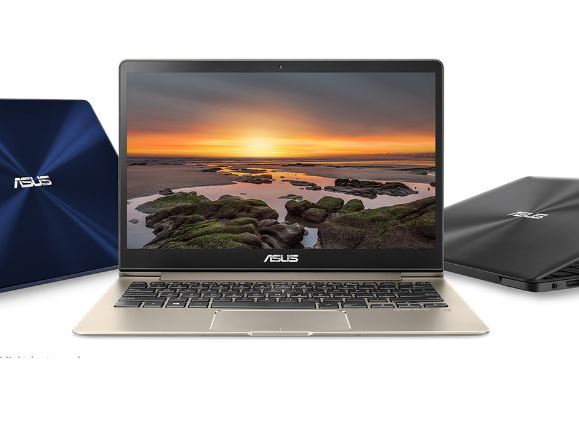
The ASUS 2-in-1 Q535 review conversation has resurfaced in recent weeks in the way older, distinct machines sometimes do—pulled back into view by renewed discussion around convertible laptops that tried to merge creator-class specs with a 360-degree hinge. In a market now crowded with thin-and-light 2-in-1s that lean heavily on integrated graphics, the Q535’s core identity still reads differently: a large 15.6-inch convertible built around a quad-core Intel Core i7 and paired, in widely sold configurations, with NVIDIA discrete graphics.
That mix is also why the ASUS 2-in-1 Q535 review angle keeps landing in used-market writeups, repair threads, and “what still holds up” comparisons. Some interest is simply practical. The machine’s form factor makes it a candidate for desk-to-couch work, note-taking, and occasional stylus use, while its older component choices can still suit photo and video workflows that do not depend on the newest encoders. The record is not uniform, though. The Q535 is remembered as much for its compromises—weight, battery tradeoffs, and the limits of its midrange GPU—as for its ambitions.
Hardware that defines it
Processor and graphics pairing
The most consistent anchor point for an ASUS 2-in-1 Q535 review is its CPU-GPU pairing, because it explains nearly every strength and constraint users still describe. In the commonly referenced Q535UD configuration, the system is built around Intel’s 8th-generation Core i7-8550U, a low-voltage quad-core chip that was widely used in premium productivity laptops of its era. That selection signaled a machine tuned for everyday responsiveness more than sustained workstation loads, but it also offered enough headroom to keep heavier apps moving without feeling immediately dated.
More unusual for a convertible in this class was the inclusion of a dedicated NVIDIA GeForce GTX 1050 with 2GB of GDDR5 VRAM in the same family of builds. That discrete GPU is central to why the Q535 is still mentioned alongside multimedia convertibles rather than purely office-focused 2-in-1s. But it also sets expectations: the GTX 1050 can accelerate some creative tasks and handle older or lighter games, yet the 2GB VRAM ceiling shows up quickly once settings climb or resolutions go beyond 1080p.
Memory and storage realities
Many descriptions of the Q535UD point to 16GB of memory, and a prominent community review notes that this 16GB setup is split between soldered and replaceable RAM, a detail that matters for long-term servicing and upgrades. That same review also describes a dual-drive arrangement: a 256GB M.2 SSD paired with a larger 2TB 2.5-inch hard drive. For its time, that layout was a practical compromise—fast boot and app launches on the SSD, bulk storage on the HDD.
The storage story, however, is also where age becomes tangible. Mechanical drives bring noise, heat, and occasional reliability questions as units accumulate years of use. In today’s resale environment, many surviving machines will have been altered by owners, either swapping the HDD or replacing the SSD. Publicly available spec listings also emphasize the i7-8550U and GTX 1050 2GB combination as defining points, reinforcing that buyers often key on those major components first. An ASUS 2-in-1 Q535 review that ignores storage tends to miss why some units still feel quick while others feel unacceptably sluggish.
Display and the 4K push
Display is another reason the ASUS 2-in-1 Q535 review still attracts attention, because the machine was marketed around a high-resolution panel in a convertible body. Product and review materials frequently associate the Q535 family with a 15.6-inch 4K touchscreen, positioning it as a multimedia-first device rather than a basic 1080p work laptop. In the adjacent ZenBook Flip 15 (UX561UD) line—closely linked to Q535UD discussions—Notebookcheck’s testing also emphasizes a “really good 4K panel” alongside the i7-8550U and GTX 1050 combination.
That 4K emphasis cuts two ways. For reading, editing photos, or running dense timelines, the added pixels can be genuinely useful. It also flatters the machine in quick demonstrations; sharpness is immediate, and touch interaction can feel more “premium” when UI elements look crisp. But 4K is not free, especially on a 15.6-inch convertible expected to run on battery and keep thermals controlled. A recurring practical note in performance testing is that the GTX 1050 tier is not built for “4K gaming” in a slim convertible, with Full HD described as the realistic compromise for many titles.
Ports, radios, and the “era” feel
The Q535’s connectivity suite is part of how it signals its generation. Detailed spec pages for the Q535UD-BI7T11 describe a conventional laptop port mix that includes USB Type-C alongside other standard connections, reinforcing the model’s placement in the transition period when Type-C was arriving but not yet the only path for expansion. In the same family of publicly discussed configurations, the machine’s identity as a big convertible—rather than an ultra-minimal tablet-style 2-in-1—shows up in the expectation that physical ports remain part of daily use.
Wireless details matter here because users increasingly rely on long-lived laptops for streaming, cloud sync, and remote work. ASUS continues to host a Q535UD support portal, which is less about celebrating the model and more about showing it still sits within a maintained product-support structure, at least for documentation and downloads. That ongoing footprint helps explain why the Q535 keeps circulating in troubleshooting threads: owners can still reference official support pages when drivers, firmware, or compatibility questions arise. It does not guarantee modern performance, but it does keep the machine present in the public record.
Battery as a design trade
Battery life was always going to be a pressure point for a 15.6-inch 4K convertible with discrete graphics. The Best Buy product listing for the Q535UD-BI7T11 class of machine specifies “up to 5 hours” of battery life, a figure that frames the laptop as a plug-in-first portable rather than an all-day traveler. That number is not surprising given the panel choice and component stack, but it does shape how the Q535 fits into 2026 expectations.
The battery narrative also tends to become more complicated over time, because used units rarely perform like launch-day samples. Battery wear, background software, and the condition of the storage drive can all change the day-to-day impression. Reviewers who tested comparable ZenBook Flip 15 hardware also noted the balance between performance and efficiency, with Notebookcheck explicitly pointing out that the integrated Intel UHD Graphics can handle basic output at lower consumption than the dedicated GPU, contributing to longer runtimes when the dGPU is not needed. In real life, that means the Q535’s endurance can swing depending on workload and settings—sometimes significantly.
How it works day to day
The 360-degree hinge in practice
A convertible lives or dies by its hinge, and the Q535’s identity is inseparable from the 360-degree design that lets it shift between laptop, tent, stand, and tablet orientations. In Q535UD discussions, the model is directly equated with the ZenBook Flip 15 UX561UD, reinforcing that this was ASUS’s entry into a specific premium 2-in-1 segment built around that rotating hinge concept. The hinge gives the Q535 a broader set of “places it can go” than a standard clamshell, and that flexibility is still the most visible reason someone might pick it up in 2026.
But the hinge also amplifies the tradeoffs. A 15.6-inch machine is large in the hands, and once it flips into tablet mode the weight becomes impossible to ignore for long sessions. That reality tends to shift usage patterns: many owners treat it as a laptop first, a stand-mode media device second, and a true tablet only occasionally. The more the system is carried between rooms or used on laps, the more the hinge design becomes something that is either appreciated daily or tolerated as an occasional convenience. An ASUS 2-in-1 Q535 review that stays honest usually ends up describing both experiences.
Keyboard, touchpad, and the “laptop” half
Even among people who buy convertibles, the keyboard and touchpad remain the main interface most of the time. The Q535UD-BI7T11 listing describes a backlit keyboard and a multitouch touchpad, positioning the device as a conventional laptop experience with convertible capability rather than a touchscreen-first tablet that happens to have keys. In practice, that distinction matters. It frames expectations around travel work, long typing sessions, and the kind of routine productivity where touch is secondary.
What tends to surprise some users is that the “big 2-in-1” format can be more stable for typing than smaller convertibles, simply because there is more chassis real estate and often a more traditional keyboard layout. The flip side is that the convertible structure can influence rigidity, especially over time and with frequent mode switching. Most day-to-day impressions ultimately come down to how well the machine holds up structurally: hinge tension, deck flex, and whether the touchpad remains consistent. Those are not spec-sheet items, but they shape whether the Q535 feels like a durable tool or a careful-at-the-edges device.
Touch and stylus expectations
The Q535’s touch capability is not incidental; the model is repeatedly associated with a 4K touchscreen panel, which makes touch interaction part of the basic proposition. For many buyers, that means two workflows: quick navigation and occasional pen-like input. Some third-party Q535 writeups describe an included stylus in certain packages, emphasizing note-taking and on-screen marking as part of the experience. The public record across retailers and reviewers is not perfectly uniform on what ships in every box, but the consistent theme is that touch is a core feature, not a novelty.
Touch changes how the machine is used in small ways. It becomes a faster way to scroll, zoom, or select controls when the device is in stand mode. It also becomes a fallback when Windows UI elements feel more natural to poke than to click. But the Q535 is not a modern thin tablet, and it does not behave like one in the hands. The most grounded expectation is that touch is helpful when the laptop is propped up—less so when it is carried like a slate. Any ASUS 2-in-1 Q535 review that treats it as an iPad substitute tends to overpromise.
Audio, webcam, and “living room” use
Convertibles often end up as living-room machines, and the Q535 was marketed as multimedia-friendly. The Best Buy listing specifies Harman/kardon stereo speakers, which signals an intentional audio partnership rather than generic laptop sound. That detail matters because audio is one of the first areas where older laptops can feel dated; a branded tuning effort can keep the experience acceptable longer, especially for casual streaming.
The same listing also references facial recognition as a security feature, aligning the Q535 with Windows Hello-era convenience features that reduce friction in daily use. In practice, those features help a device remain comfortable even when other parts age. A convertible that unlocks quickly, sounds decent, and works reliably on a couch can keep a place in a household beyond its peak performance years.
Still, multimedia usage can expose the machine’s compromises. Fan noise, heat on soft surfaces, and battery drop during video playback at high brightness are issues that tend to surface in real living-room sessions rather than office desks. The Q535’s 4K panel can look excellent for films, but it can also invite higher power draw if users keep brightness elevated.
Build, weight, and handling
The Q535’s size is both its selling point and its burden. Third-party reviews have described the unit as “somewhat heavy and bulky,” putting a concrete figure around it—about 4.4 pounds in at least one widely circulated spec writeup. That weight is not extreme for a 15.6-inch laptop with discrete graphics, but it is significant for a device that is supposed to flip into tablet mode.
Handling matters because the convertible promise is physical, not abstract. A lighter 13-inch 2-in-1 can be carried like a notebook; a larger 15.6-inch convertible often becomes something that is moved, not held. That shifts how the hinge modes are used. Tent mode becomes a way to save space on a table. Stand mode becomes a way to watch or present. True tablet mode becomes brief—signing documents, making a quick sketch, or navigating a recipe on a counter.
This is where the ASUS 2-in-1 Q535 review story becomes unusually consistent: appreciation for the ambition, paired with realism about what a large convertible can comfortably be.
Performance and real limits
Everyday speed and the “still fine” factor
In routine tasks, the Q535’s core configuration remains capable, at least on paper. The i7-8550U is the kind of quad-core chip that can keep browsers, office apps, and light editing responsive when paired with sufficient memory and solid-state storage. For many people revisiting the ASUS 2-in-1 Q535 review topic now, that’s the key question: does it still feel fast in ordinary use, or does it stumble under modern software weight.
The answer tends to depend on the specific unit and its storage setup. A dual-drive machine that relies heavily on an older HDD for active files can feel slower than expected, even if the CPU is not the bottleneck. A unit that has been refreshed with a healthier SSD situation can feel surprisingly modern for basic work. And because the Q535’s screen is 4K-class in many versions, it can make the entire experience look higher-end even when the internal performance is only midrange by today’s standards.
None of that turns it into a current flagship. It does explain why the Q535 remains a plausible “secondary laptop” in 2026 rather than an automatic discard.
Creative workloads: where it helps, where it strains
The Q535’s discrete GPU is a major reason creators still bring it up. Notebookcheck’s review of the closely linked ZenBook Flip 15 hardware highlights the pairing of an i7-8550U with a GeForce GTX 1050 as part of what makes it a “versatile convertible,” suggesting genuine capability beyond office work. For certain creative tasks—GPU-accelerated effects, timeline scrubbing, or basic color work—the presence of a dedicated GPU can still matter, even if it is an older part.
At the same time, the GTX 1050’s 2GB VRAM is a hard boundary in modern creative workflows. Notebookcheck notes that VRAM “quickly reaches its limits,” a point made in the context of gaming but equally relevant when large textures or heavy GPU effects enter the picture. The Q535 can handle some creator tasks, but it is not built for the most demanding 4K pipelines, especially if the project leans on GPU memory.
The machine’s 4K display can be an advantage for visual work, but it also tempts users into workloads that stress the GPU. In that sense, the Q535’s strongest feature can also be what exposes its ceiling.
Gaming: the midrange GPU reality
Gaming is often where older laptops get judged harshly, and the Q535 sits in an awkward spot: it has a gaming-capable GPU tier for its generation, but it is not a gaming laptop in cooling design or component budget. Notebookcheck’s testing describes the GTX 1050 as capable of “solid 3D performance” overall, but it also states that a “4K gaming experience” is not realistic on this convertible and that Full HD is the workable target. That framing is a useful baseline for expectations.
The practical limitations show up in two places. First is VRAM. With 2GB, modern titles can hit limits quickly, forcing lower textures or settings even if raw GPU compute is acceptable. Second is the chassis context: a thin convertible has less thermal room than a dedicated gaming machine, and sustained loads can lead to throttling or higher fan noise depending on conditions.
For lighter games, older AAA titles, and esports-style settings at 1080p, the Q535 can still deliver a playable experience in the way midrange Pascal-era laptops often can. But anyone buying it primarily for gaming today is buying into a compromise that is already documented in the testing record.
Thermals and noise under load
Thermal design is one of the hardest things to infer from a spec sheet, and yet it shapes long-term satisfaction more than almost any single component choice. Notebookcheck’s analysis of the platform makes a subtle but important point: the Intel UHD Graphics 620 handles “primary video output” for lighter tasks with lower battery consumption than the dedicated GPU, which implies a design that leans on switching graphics to manage power and heat. That is standard behavior, but it also indicates how the machine is meant to be used: the GTX 1050 is there for bursts and heavier moments, not for everything all the time.
Under sustained GPU load, a convertible chassis can become louder and warmer than a comparable clamshell with more conventional internal space. Over years of use, fan condition and thermal paste aging can widen that gap. This is where the used-market Q535 story becomes less predictable than the launch-day story. Two machines with identical listed specs can behave very differently depending on maintenance, dust, and whether the owner relied heavily on the HDD.
In an ASUS 2-in-1 Q535 review written today, thermals are often treated as a condition report rather than a fixed trait.
Battery life in modern usage
Battery life is where older 4K convertibles often fall behind modern expectations. The Best Buy listing for the Q535UD-BI7T11 describes battery life as “up to 5 hours,” which places it in a category that expects charging breaks rather than all-day mobility. Even at launch, that positioning suggested a machine designed for performance and display quality first.
In 2026, that figure matters even more because battery wear is an unavoidable variable. Many units in circulation will have lost a meaningful share of original capacity. Add in the power draw of a bright 4K panel, and the Q535 becomes a device that may be best used with a charger within reach, especially for heavier tasks. Notebookcheck’s note about longer runtimes when relying on integrated graphics hints at a practical strategy: battery life can look acceptable when the dGPU stays mostly idle. Real-world use does not always cooperate, though—especially with modern browser loads and background syncing.
Battery performance, in other words, is part of the Q535’s story, not a footnote.
Market context and ownership questions
Model naming and what “Q535” covers
One reason the ASUS 2-in-1 Q535 review topic stays messy is that “Q535” is often used as shorthand for a family of related configurations rather than a single perfectly consistent spec. The Q535UD label appears repeatedly in public listings and discussions, and community reviews have described it as closely tied to the ZenBook Flip 15 UX561UD naming used outside the U.S.. That linkage matters because it helps explain why different sources describe slightly different storage, RAM, or panel details while still referring to the same basic machine.
This is not unique to ASUS, but the Q535 branding has been particularly prone to shorthand. Some owners talk about “the Q535” when they mean a Best Buy-sold variant. Others mean the broader Flip 15 platform. That ambiguity is one reason shoppers can misread a used listing and assume every Q535 has identical storage or the same panel option.
For reporting and for purchase decisions, the safest approach has been to treat “Q535” as a headline, then verify the suffix model number and the actual installed components. The public record supports that caution simply by showing how many slightly different descriptions coexist.
The retail footprint and why it’s still discussed
The Q535’s retail story is part of its afterlife. A widely shared community review notes that the Q-series appeared to be a Best Buy exclusive tied to an arrangement with ASUS to release the “Q” series ahead of the ZenBook lineup in the U.S.. That kind of channel-specific branding can keep a model visible long after it disappears from manufacturer marketing, because the retailer listing and user reviews remain a persistent reference point.
It also shapes how the machine is remembered. A Best Buy-facing product line tends to generate a lot of consumer feedback, including the kinds of ownership notes that matter years later: hinge durability, battery decline, drive failures, and whether the laptop still feels snappy. That is part of why the ASUS 2-in-1 Q535 review phrase continues to circulate: it is not only a device, but also a set of public impressions archived in familiar retail ecosystems.
At the same time, retail visibility can flatten nuance. It encourages people to talk about “the model” as if there was only one configuration, even when the Q535 label covered variants. That gap is where misunderstandings tend to start.
Support, drivers, and keeping it running
A practical reason older laptops remain in circulation is the availability of official support pages, even if the product is no longer current. ASUS maintains a Q535UD support portal that anchors documentation and helpdesk resources for the model line. That continued presence is significant for owners attempting OS updates, driver reinstalls, or troubleshooting hardware behavior.
Support pages do not solve everything. They do, however, reduce the friction of ownership compared with machines that effectively vanish from the manufacturer’s site. For an older convertible with discrete graphics, driver stability can be as important as raw component capability. GPU switching behavior, sleep-wake reliability, and touch input responsiveness can all be influenced by driver and firmware combinations.
This is also where the “publicly established” record becomes thin. ASUS provides the support hub, but the lived reality of long-term upkeep depends on individual hardware condition and the state of the OS installation. The Q535 is not a machine with a single known failure pattern in the public record; it is a machine with typical aging-laptop issues that appear in clusters.
Used-market inspection: what’s verifiable
The Q535’s current relevance is, in large part, used-market relevance. Spec listings and community reviews give a strong template for what many units were: i7-8550U, 16GB RAM, GTX 1050 2GB, and a dual-drive arrangement centered on a 256GB SSD plus a 2TB HDD. That template is useful because it lets a buyer quickly spot a listing that deviates—sometimes for good reasons, sometimes because the seller is guessing.
The problem is that “verifiable” details are often not visible in photos. Storage can be misreported. Battery health is rarely measured in listings. A 4K touchscreen can be claimed without showing the scaling behavior or panel ID. And because Q535 is frequently used as shorthand for the Flip 15 platform, a listing can inherit specs from the wrong variant.
What can be checked, at least in principle, is whether the machine reports the expected CPU and GPU combination. The i7-8550U and GTX 1050 2GB pairing is repeatedly documented in review material for this hardware family. If a listing claims the same while also showing different GPU details, it is a signal to pause. In that sense, the public record is most useful as a fraud filter, not a guarantee.
How it compares in 2026 expectations
The hardest question is not what the Q535 was, but what it is now relative to modern laptops. As a 15.6-inch convertible with an i7-8550U-class processor and GTX 1050 2GB graphics, it sits behind current performance tiers, but it still offers something that is less common today: a large 2-in-1 that pairs a high-resolution screen with dedicated graphics in a single chassis. That combination is why an ASUS 2-in-1 Q535 review can still read like a debate rather than a settled verdict.
Modern 2-in-1s often trade discrete graphics for battery life and weight. Gaming laptops trade hinge versatility for cooling. The Q535 is an older attempt to split the difference. Notebookcheck’s characterization of the ZenBook Flip 15 platform as “extremely versatile” captures the spirit of that design goal, even while the same testing underscores limits such as the impracticality of 4K gaming and the constraints of 2GB VRAM.
In 2026 terms, the Q535 is best understood as a specialized compromise that can still fit specific needs. It is not the simplest answer, and that may be why it remains discussable.
Conclusion: The ASUS 2-in-1 Q535 review record shows a machine that continues to stand out mostly because it attempted a combination that still feels unusual—large convertible design, 4K-class display, and discrete NVIDIA graphics in a single consumer package. The public facts are easier to pin down than the lived experience: i7-8550U and GTX 1050 2GB configurations are well documented, and the model’s convertible identity is not in dispute. What remains harder to resolve cleanly is how any specific unit performs today, because the Q535’s real-world story is shaped by battery wear, storage condition, and whether the machine has been modified since purchase.
That uncertainty is not trivial; it is the difference between a convertible that still feels sharp for everyday work and a system that struggles under modern multitasking. Official support pages keep the laptop anchored in an accessible documentation trail, but they do not standardize the condition of hardware circulating in resale channels. For some owners, the Q535 still occupies a useful middle ground: a big-screen 2-in-1 that can do more than office duty. For others, it is a reminder that ambitious hybrids often age unevenly. The next chapter will likely be written less by new reviews than by parts availability, battery survivability, and whether the used-market supply continues to justify the effort of keeping this particular compromise alive.